What Is a 3D Heart and How Can You Use It?
A 3D Heart is more than just a digital design—it's a versatile asset for creators, hobbyists, and professionals alike. Whether you're into crafting, graphic design, or digital printing, this product offers a range of formats and uses that can enhance your projects with depth, detail, and artistic flair. In this article, we’ll explore what a 3D Heart is, its key features, and how it can be applied in different creative scenarios.
Understanding the Components of a 3D Heart Product
The 3D Heart product is a digital bundle designed to give users maximum flexibility. Inside the ZIP folder, you’ll find:
- 10 SVG files: Scalable vector graphics (SVG) are ideal for cutting machines like Cricut or Silhouette. Each file contains either separate layers or a merged version of the heart, making them perfect for layered designs or cohesive prints.
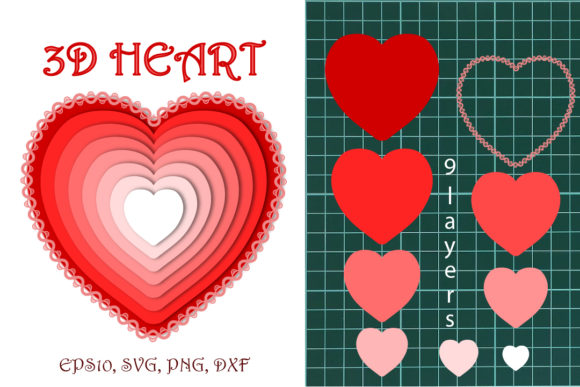
- 11 PNG files: These include high-resolution images at 4000x4000 pixels, suitable for digital printing and use as clipart. They come in both layered versions and ready-to-use hearts with and without shadows.
- 1 DXF file: Designed for CAD software and Autodesk applications, this format allows for precise editing and integration into technical or architectural projects.
- 1 EPS-10 file: Optimized for Adobe Illustrator, this file ensures compatibility with professional design tools while maintaining scalability and clarity.
All layers are separated onto individual artboards in the EPS file, giving you full control over each part of the heart’s design. This makes the product especially valuable for those who want to customize or animate their creations.
Why Choose a 3D Heart?
The appeal of a 3D Heart lies in its adaptability and visual impact. Unlike traditional 2D hearts, these designs have dimensionality, making them stand out in both physical and digital spaces. Here are some reasons why this product might suit your needs:
- Visual Depth: The added dimension gives your project a more realistic and eye-catching appearance.
- Multiple Uses: From cut files to print-ready images, the 3D Heart can serve a variety of purposes across different platforms.
- Customization Potential: With layered SVGs and separate artboards in the EPS file, you can easily modify colors, sizes, and shapes to match your vision.
- High Resolution: The PNG files offer ultra-detailed imagery, ensuring crisp results when printed on materials such as fabric, wood, or paper.
Who Benefits from Using a 3D Heart?
This product is tailored for a wide audience. For example:
- Crafters can use the SVG and DXF files in cutting machines to create layered cards, custom jewelry, or decorative signs.
- Graphic Designers will appreciate the EPS and PNG formats for adding a dynamic element to logos, posters, or social media graphics.
- Business Owners looking to personalize products—like mugs, t-shirts, or promotional items—can leverage the print-ready versions for consistent branding.
- Artists and Animators may find the layered structure useful for creating animations or interactive digital illustrations.
Real-World Applications of a 3D Heart
To truly understand the value of a 3D Heart, let’s look at how it can be used in practical settings:
1. Custom Merchandise and Print-on-Demand
If you run an online store or work with print-on-demand services, the 3D Heart is a powerful tool. Its high-resolution PNGs are perfect for printing on clothing, phone cases, or wall art. The shadow options add a subtle yet effective sense of realism, helping your products catch attention and convey quality.
2. Digital Art and Illustrations
For artists working in digital environments, the EPS file provides a clean and scalable way to integrate the heart into larger compositions. The layered approach allows for experimentation with lighting, texture, and perspective, enabling unique visual effects.
3. Signage and Decorative Crafts
With compatible formats for both cutting and printing, the 3D Heart is great for DIY signage. Whether you’re making a birthday banner or a romantic gift for a loved one, the layered SVG files let you build intricate designs using multiple materials or colors.
4. Educational and Presentation Materials
In teaching or presentation contexts, the 3D Heart can be used to illustrate concepts related to anatomy, symbolism, or three-dimensional modeling. The DXF file is particularly useful here, as it integrates smoothly into CAD-based educational resources.
Software Compatibility and Requirements
One of the strengths of the 3D Heart product is its broad compatibility with popular design and cutting software. Specifically, the following programs support the included file types:
- Adobe Illustrator: Ideal for editing the EPS and SVG files, allowing for advanced customization.
- Cricut Design Space: Perfect for using the SVG files with Cricut machines for precision cuts.
- Silhouette Studio: Supports SVG files for crafting with Silhouette cutting devices.
- Inkscape: A free alternative for working with SVG files and modifying the design elements.
- CorelDRAW: Compatible with SVG and DXF formats, supporting detailed edits and layouts.
Before downloading, ensure your software supports these formats. If you're unsure about compatibility, check the software documentation or reach out to the creator for guidance.
Strengths and Practical Considerations
While the 3D Heart offers many benefits, there are also a few things to keep in mind when evaluating its suitability for your project:
Strengths
- Scalability: Vector-based formats like SVG and DXF allow for resizing without loss of quality.
- Professional Quality: The PNGs are high resolution and suitable for commercial printing.
- Layered Flexibility: Separate layers enable creative freedom, whether you're layering materials or adjusting visual elements.
- Ready-Made Options: Merged layers and pre-designed hearts save time for users who need something quick and polished.
Considerations
- Design Experience: While the files are user-friendly, some formats (like DXF or EPS) may require basic knowledge of design software to use effectively.
- Hardware Requirements: High-resolution PNGs may consume significant memory when opened in certain programs, so ensure your device has sufficient capacity.
- Printing Setup: To get the best results from the print-ready PNGs, make sure your printer and materials are suitable for large-format printing.
Evaluating the Right Format for Your Needs
Choosing the correct file type depends on your intended use. For instance:
- If you're planning to cut the heart from vinyl or cardstock, go with the SVG files.
- If you're designing for print, the PNG files are likely the best choice due to their transparency and resolution.
- For CAD-related tasks, the DXF file is essential.
- When working in Adobe Illustrator for professional design, the EPS file will provide the most seamless experience.
Take some time to review the contents of the ZIP folder before starting your project. Knowing which files you need upfront can streamline your workflow and avoid unnecessary rework later on.
Getting Started with Your 3D Heart
Once you’ve downloaded the files, open them in your preferred software. For beginners, start with the SVG or PNG files if you're using a cutting machine or printer. More experienced users may dive into the EPS or DXF files for deeper customization.
Here’s a quick guide to help you begin:
- Extract the ZIP folder to access all files.
- Open the desired file in your software (e.g., Adobe Illustrator for EPS).
- Experiment with color, size, and layout to fit your project.
- Save your final design in the appropriate format for your next step, whether that’s printing or exporting for web use.
Remember, the layered structure of the heart means you can adjust individual components independently, opening up even more creative possibilities.
Where to Find Support and Further Help
Using a 3D Heart should be a smooth and enjoyable process. However, if you encounter any issues or have questions about the files, don’t hesitate to contact the creator. Svetlana is available to assist with any concerns, whether they relate to file compatibility, scaling issues, or design tips.
You can also refer to online tutorials or forums specific to your software for additional guidance. Many communities offer free resources that can help you make the most of your new digital assets.
Final Thoughts on Using a 3D Heart
The 3D Heart is a multifaceted digital product that bridges the gap between creativity and functionality. Its various file formats cater to different workflows and skill levels, making it accessible to everyone from casual crafters to seasoned designers. By understanding its capabilities and limitations, you can determine how best to incorporate it into your own projects.
Whether you're designing for a personal gift, a business promotion, or an artistic creation, the 3D Heart adds a touch of elegance and professionalism. Explore its potential today and discover how it can bring your ideas to life with greater depth and dimension.
Thanks for visiting my store. If you have any questions, please contact me: support@store.com. Happy creating!